TP-Link
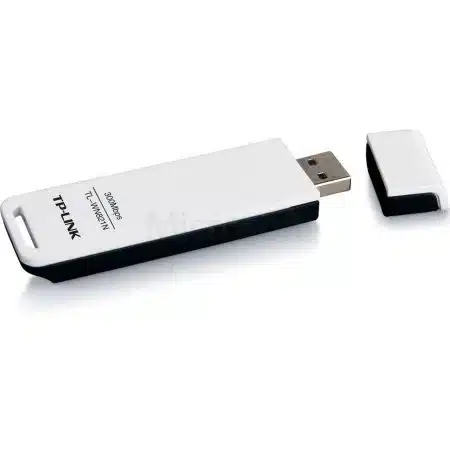
TP-Link 150Mbps Wireless N Nano USB Adapter - TL-WN725N
KES 1,500
In StockKey Features & Specs
Feature Specification
- Model – TL-WN725N (Hardware Version 2/3 common)
- Wireless Standards – IEEE 802.11b/g/n
- Frequency -2.4~2.4835GHz
- Signal Rate -Up to 150Mbps (dynamic)
- Transmit Power -<20dBm (EIRP)
- Reception Sensitivity -150M: -68dBm@10% PER, 11M: -85dBm@8% PER
- Antenna -Internal Omni-directional
- Interface – USB 2.0
- Dimensions -0.73 x 0.59 x 0.28 in (18.6 x 15 x 7.1 mm)
- Operating Systems -Windows 11/10/8.1/8/7/XP, macOS 10.9-10.15, Linux Kernel 2.6.18–4.4.3
- Security -64/128-bit WEP, WPA/WPA2, WPA-PSK/WPA2-PSK
- Modes – Ad-Hoc and Infrastructure
- Certification – CE, FCC, RoHS
Product Description
TP-Link 150Mbps Wireless N Nano USB Adapter - TL-WN725N
The TP-Link TL-WN725N 150Mbps Wireless N Nano USB Adapter is a go-to, cheap way to add wireless to your desktop, laptop, or older stuff without built-in WiFi. This tiny USB thingy gives you speeds up to 150Mbps on the 2.4GHz band, which is fine for everyday stuff online.
We've got the real TP-Link TL-WN725N at good prices, and we ship fast with good support. Looking for a TP-Link TL-WN725N price? Get yours today!
Why get the TP-Link TL-WN725N Nano USB Adapter?
The TP-Link TL-WN725N is a winner because it's so small. At just 18.6 x 15 x 7.1 mm and super light, you can plug it into your USB port and almost forget it's there. Leave it in when you're traveling with your laptop.
Key Highlights
- 150Mbps Wireless N Speed: Good for browsing, email, social media, watching videos, and online calls.
- 2.4GHz Band Support: Works with just about every router.
- Easy Setup: Just plug it in on most Windows PCs. Drivers are there for old systems or Linux.
- Safe: Uses WPA/WPA2 encryption to keep your stuff private.
- SoftAP Mode: Make your wired PC a WiFi hotspot to share internet.
This thing uses the Realtek RTL8188EUS chip (in V2/V3 models), which is known to be reliable and doesn't use much power. It also works with older 802.11b/g networks.
TP-Link TL-WN725N Key Specifications
Here's what's under the hood, so you know why the TL-WN725N is a good pick if you're on a budget:
Feature Specification
- Model - TL-WN725N (Hardware Version 2/3 common)
- Wireless Standards - IEEE 802.11b/g/n
- Frequency -2.4~2.4835GHz
- Signal Rate -Up to 150Mbps (dynamic)
- Transmit Power -<20dBm (EIRP)
- Reception Sensitivity -150M: -68dBm@10% PER, 11M: -85dBm@8% PER
- Antenna -Internal Omni-directional
- Interface - USB 2.0
- Dimensions -0.73 x 0.59 x 0.28 in (18.6 x 15 x 7.1 mm)
- Operating Systems -Windows 11/10/8.1/8/7/XP, macOS 10.9-10.15, Linux Kernel 2.6.18–4.4.3
- Security -64/128-bit WEP, WPA/WPA2, WPA-PSK/WPA2-PSK
- Modes - Ad-Hoc and Infrastructure
- Certification - CE, FCC, RoHS
These specs make the TL-WN725N a solid wireless N nano USB adapter for basic use. It's cheap.
Even with faster WiFi adapters out there, the TL-WN725N still works well if:
- Need Something Small: It's so small you might not know it's there!
- Want Something Cheap: It's a super cheap way to add WiFi to an old computer.
- SoftAP is useful: You can make a mobile hotspot from a wired connection.
- You don't want to kill battery: It doesn't use much power.
- Want compatibility: Works with Raspberry Pi and older PCs.
How to Set It Up
Setting up the TP-Link TL-WN725N is easy:
For Windows 10/11:
1. Plug it in.
2. Windows installs drivers automatically.
3. Connect to WiFi.
For Older Windows:
1. Download the driver from TP-Link's site.
2. Run the setup.
3. Pick TP-LINK Wireless Configuration Utility for SoftAP.
For macOS and Linux:
* macOS: Drivers up to 10.15 .
* Linux: Built-in support; for newer ones, get drivers online.
Is It Compatible?
Yes!
- Windows 11: Works great.
- macOS: Up to 10.15.
- Linux: Needs driver install.
If you need something faster:
* TP-Link Archer T2U Nano: AC600, dual-band, small.
* TP-Link Archer TX20U Nano: WiFi 6, AX1800 speeds.
* BrosTrend Linux-Compatible Adapters: Good for Raspberry Pi.
We only sell real TP-Link at;
- Best prices on TP-Link TL-WN725N.
- Fast shipping.
- Help with setup if needed.
- Deals on other stuff.