TP-Link
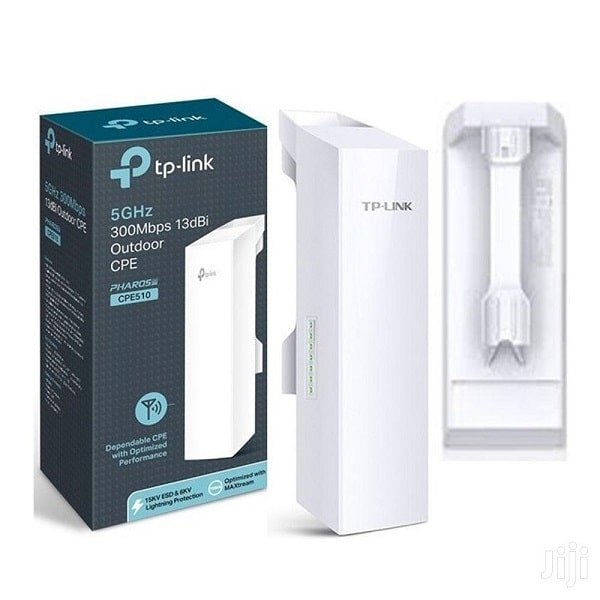
TP-Link 5GHz 300Mbps 13dBi Outdoor CPE - TL-CPE510
KES 6,500
In Stock- Built-in 13dBi 2×2 dual-polarized directional MIMO antenna
- Adjustable transmission power from 0 to 23dBm/200mw
- System-level optimizations for more than 15km long range wireless transmission
- TP-LINK Pharos MAXtream TDMA (Time-Division-Multiple-Access) technology improves product performance in throughput, capacity and latency performance, ideal for PTMP applications
- Centralized Management System – Pharos Control
- AP / Client / AP Router / AP Client Router (WISP) operation modes
- Passive PoE Adapter supports up to 60 meter (200 feet) Power over Ethernet deployment and allows the device to be reset remotely
Product Description
TP-Link 5GHz 300Mbps 13dBi Outdoor CPE TL-CPE510
Even though it's 2025, the TP-Link Pharos TL-CPE510 is still a top pick for outdoor wireless. It's reliable, doesn't cost a ton, and gets the job done. If you need to connect buildings, give your farm Wi-Fi, set up security cameras, or get internet to somewhere remote, the TL-CPE510 can create stable point-to-point or point-to-multipoint links that reach over 15km if you have a clear shot.
Why the TL-CPE510 Is Still a Go-To
Newer options are out there, but the TL-CPE510 is still popular because:
- It can reach 15km+ (if you have a clear view)
- It has a 300Mbps speed on 5GHz (expect around 150–180Mbps in real use)
- It has a 13dBi directional antenna (focuses the signal)
- It runs on a Qualcomm Atheros chip
- It protects against lightning (15KV ESD + 6KV)
- It's IPX5 weatherproof
- It uses 24V PoE (power over Ethernet, up to 60m cable)
- It comes with free Pharos management software
- It's the best value for what you pay
Tech Specs (Latest V3.20 Hardware)
Feature Specifics
Model - TL-CPE510 (V3/V4)
Frequency - 5.15–5.85 GHz (depends on your country)
Wireless - 802.11a/n
TX Power - Up to 27dBm (500mW), adjustable
Antenna - 13dBi dual-polarized MIMO 2×2
Beam Width - 27° (H) / 41° (V)
Speed - 150–180Mbps+ (depends on distance)
Distance - 15km+ (clear line of sight)
Processor - Qualcomm Atheros 560MHz
Memory - 64MB DDR2 RAM, 8MB Flash
Ethernet - 1× 10/100Mbps shielded
PoE - 24V 0.6A (adapter included)
Protection - 15KV ESD, 6KV lightning, IPX5
Temperature - -40°C to +70°C
Management -Pharos Web, Pharos Control
Modes - AP, Client, Bridge, Repeater, etc.
Installers often see these results:
- 0–5km: 150–180Mbps
- 5–10km: 80–120Mbps
- 10–15km: 30–60Mbps (good for security cameras and basic internet)
- 15km+: 10–30Mbps (if everything's perfect)
These are better than most regular routers.
Top Uses
1. Connecting buildings
2. Security camera networks
3. Small internet providers
4. Farms
5. School Wi-Fi
6. Construction sites
7. Resorts
8. Mines
9. Emergency networks
10. Rural internet
If any of these sound like you, the TL-CPE510 might be a good fit.
Built Tough
It's made for the outdoors:
- IPX5 weatherproof
- Lightning protection
- Grounding
- Adjustable mount
- Shielded Ethernet
Installers say these last for years without problems.
Easy to Aim
The focused antenna makes aiming easier:
- Signal LEDs on the back
- Beep sound to help align
- Signal info in the web interface
- Alignment usually takes minutes
This saves time and money on installation.
Pharos OS
The software is surprisingly good, with features like:
- Spectrum analysis
- MAXtream TDMA (improves performance)
- Speed test
- Dynamic frequency selection
- Bandwidth and access control
- Ping watchdog
- SNMP & syslog
- Free Pharos Control software
You can manage a lot of these from one computer.
How to Set Up a Link
1. Mount the units
2. Connect power and laptops
3. Set one as Access Point, pick a channel
4. Set the other as Client, connect to the AP
5. Aim them using the lights or sound
6. Run a speed test
7. Secure it with a password
8. Turn on MAXtream and ping watchdog (optional)