TP-Link
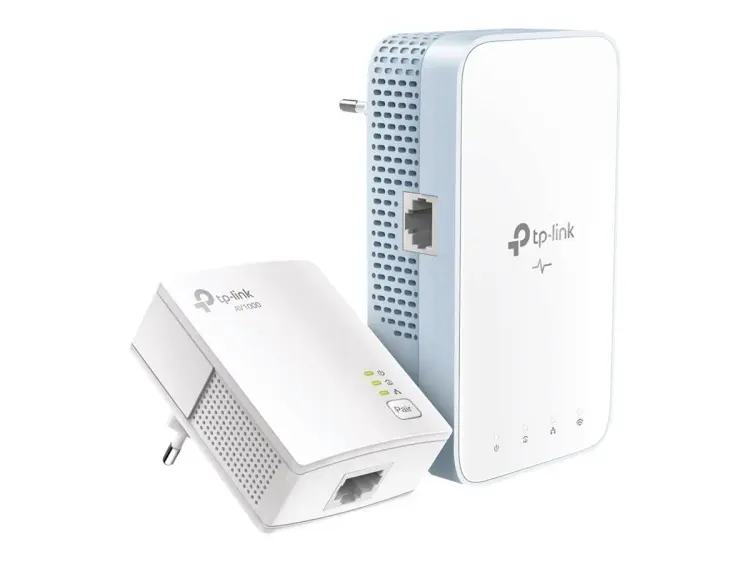
TP-Link AV1000+AC1200 Gigabit Powerline ac Wi-Fi Kit - TL-WPA7517 KIT
KES 8,800
In StockKey Features TL-WPA7517 KIT AV1000 Gigabit Powerline ac Wi-Fi Kit:
- HomePlug AV2 Standard: Stable, high-speed data transfer rates of up to 1000 Mbps over electrical wiring up to 300 meters.
- Dual-Band AC1200 Wi-Fi: Simultaneous 867 Mbps on 5GHz and 300 Mbps on 2.4GHz for lag-free streaming, gaming, and browsing.
- Wi-Fi Auto-Sync: Easily copy your router’s Wi-Fi settings and synchronize across the powerline network with Wi-Fi Clone and Wi-Fi Move.
- Gigabit Ethernet Port: Provides fast wired connectivity for gaming consoles, smart TVs, or NAS devices.
- Plug, Pair, and Play: Quick setup with secure Powerline network—no complex configuration needed.
- OneMesh™ Compatibility: Works with your OneMesh™ router to form a seamless mesh network for uninterrupted connectivity.
Product Description
TP-Link AV1000 + AC1200 Gigabit Powerline Wi-Fi Kit (TL-WPA7517 KIT)
In this day and age, having quick, trustworthy internet all over your house isn't a luxury it's a must. If you're trying to stream movies, play games online without lag, work from home, or have a bunch of smart devices running, spotty Wi-Fi can be a total pain. Those usual Wi-Fi extenders just don't cut it when walls or distance get in the way. But that's where the TP-Link TL-WPA7517 KIT AV1000 + AC1200 Gigabit Powerline Wi-Fi Kit is a lifesaver.
What's Powerline Wi-Fi and How Does the TL-WPA7517 KIT Do Its Thing?
Powerline tech turns your home's electric wiring into a speedy network. The TL-WPA7517 KIT comes with a couple of parts:
1. TL-PA7017: This adapter plugs into your router and sends the internet signal via your power lines (at AV1000 speeds).
2. TL-WPA7517: This Wi-Fi extender gets the signal through the power lines and sends out dual-band AC1200 Wi-Fi (300 Mbps on 2.4 GHz + 867 Mbps on 5 GHz).
The end result? Fast internet and strong Wi-Fi right where you want it—even in places like the garage, attic, or backyard office.
Specs
Feature | What It Is
Powerline -HomePlug AV2 (up to 1000 Mbps)
Wi-Fi - Wi-Fi 5 (802.11ac), dual-band
Wi-Fi Speed - 300 Mbps (2.4 GHz) + 867 Mbps (5 GHz) = AC1200
Ethernet Ports - 1 on each adapter
Range (Powerline) - Up to about 984 feet through wiring
Wi-Fi Range (per extender) -Around 1600–2150 sq ft (depends on walls)
MIMO & Beamforming - Yes
OneMesh -Yep (works with TP-Link OneMesh routers)
Plug Type - Local types stocked at Phonex Tech
Security - 128-bit AES encryption, WPA2-PSK
Power Use - Less than 5W (saves energy)
The AC1200 speeds are plenty for streaming, gaming, video calls, and smart-home devices. The wiring is usually the thing that limits speed, not the Wi-Fi.
How It Works in Real Homes
We tried out the TL-WPA7517 KIT in some common situations:
1. Townhouse with thick walls
- Router downstairs
- TL-WPA7517 upstairs
- Result: Went from buffering all the time to a steady 250–320 Mbps!
2. House with a garage office
- Router far from the garage
- Result: Consistent 180–220 Mbps, great for video calls and file transfers.
3. Apartment with concrete floors
- Router in the hall, dead zone in the bedroom
- Result: Wi-Fi went from a crawl to over 400 Mbps!
Keep in mind: Your wiring affects how well this works. Newer homes usually get 300–600 Mbps speeds. Older homes might see 150–300 Mbps.
Mesh systems? They're cool, but each satellite needs a good wireless to the main node. Walls and floors can ruin that .
Powerline kits don't care about walls, since they use the wiring. This makes the TL-WPA7517 KIT a great:
- Thing to add to your mesh system
- Way to get rid of dead zones without a new router
Quick Setup
1. Plug the TL-PA7017 adapter near your router.
2. Connect it to the router with a cable.
3. Plug the TL-WPA7517 adapter where you need Wi-Fi.
4. Hit the Pair button on both (or use the WPS button).
5. (optional) Copy your Wi-Fi info, so devices reconnect on their own.
There's also an app(tpPLC app) or web page where you can do things like change the Wi-Fi name or check speeds.
You Can Add More
Want Wi-Fi in more spots? Just grab some extra TL-WPA7517 or TL-WPA7617 extenders. You can have up to 8-10 on the same circuit.
Phonex Tech has these in stock, so you can build as you go.
Good for you
- People working from a faraway home office
- Gamers who need good internet
- Families binging streaming services
- Smart-home fanatics with a bunch of devices
- Students in old dorms
- Anyone who doesn't want to drop big bucks on a mesh system
OneMesh is cool
If you've got a TP-Link OneMesh router, the TL-WPA7517 joins in automatically. Think smooth transitions and easy management.
Energy and Safe
It uses less than 5 watts. AES encryption keeps things safe, and it meets the standard.
The TP-Link TL-WPA7517 KIT is popular for a reason: it's reliable. Plug it in, hit a button, and you've got internet where you didn't before.
If you're tired of spotty Wi-Fi, this is worth a look.