TP-Link
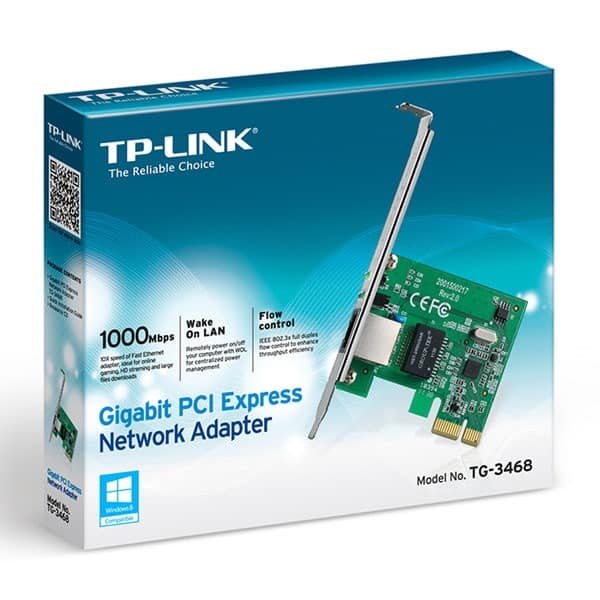
TP-Link Gigabit PCI Express Network Adapter - TG-3468
KES 2,000
In StockKey Feaatures
- It’s Gigabit Ethernet: Gets you speeds around 940–950 Mbps & supports 10/100/1000 Mbps.
- PCIe Interface: It’s PCIe x1, so it fits almost all desktop motherboards.
- Chipset: Has a Realtek RTL8168/8111 series chipset for rock-solid driver support on any OS.
- Easy Setup on Windows 10/11: Just plug it in; Windows usually installs the driver itself.
- One RJ45 Port: Auto MDI/MDIX means you don’t need special cables.
- Two Brackets Included: Fits both regular and small computers.
Product Description
TP-Link Gigabit PCI Express Network Adapter TG-3468
If your computer's internet port is old, busted, or just slow, the TP-Link Gigabit PCI Express Network Adapter TG-3468 is a popular and cheap fix.
With faster adapters becoming more common, the TG-3468 is still a solid pick for folks who want reliable 1Gbps speeds without spending too much .This network card is a good value for homes, gamers, small offices, or anyone bringing an old PC back to life.
What's the Deal with the TP-Link TG-3468?
The TP-Link TG-3468 is a 32-bit PCIe x1 Gigabit Ethernet network adapter. It plugs into your desktop to add or replace a wired internet port. It uses a Realtek chip and hits speeds of 10/100/1000 Mbps.
Key Highlights:
- Interface: PCI Express 1.1 (x1 slot) – works in any PCIe slot.
- Port: One RJ45 Ethernet port.
- Standards: IEEE 802.3, 802.3u, 802.3ab, 802.3x.
- Brackets: Comes with both regular and small brackets.
- LEDs: Lights show your internet status.
Key Features
Real Gigabit Speed
The TG-3468 can hit 1000 Mbps (1 Gbps) speeds if you have a gigabit router and a good cable. People often get around 930-950 Mbps, which is usually as fast as their hard drive can handle.
Easy Install on New Windows
Windows 10 and 11 usually recognize the card right away and install the drivers. If you have an older Windows, you can grab the drivers from TP-Link's site.
Works with Lots of Systems
- Windows: XP, Vista, 7, 8, 8.1, 10, 11.
- Linux: Works great without extra effort.
- Others: DOS, Novell NetWare, and even some Mac stuff.
Good Extras
- Wake-on-LAN (WoL): Start your PC from the network.
- Jumbo Frames: Helps with big file transfers.
- VLAN Tagging (802.1Q) and Priority Encoding (802.1p) for business networks.
- Energy Efficient Ethernet (IEEE 802.3az): Saves power when you're not using the internet.
Fits Almost Any PC
It comes with two sizes of brackets, so it works in big gaming PCs and small computers.
Here's why people still like it:
- Broken Internet Port – Storms or bad luck can kill your computer's internet. This card saves the day cheap.
- Old PCs – Older computers might only have slow internet. This card makes it way faster.
- More Reliable – Some say this card is more stable than some built-in internet chips.
- Add More Ports – You can add another internet port for special setups.
- Linux Servers – It works well with Linux.
How to Install It
1. Turn off your PC.
2. Open the case and find a free PCIe slot.
3. Plug in the card.
4. Connect your internet cable.
5. Turn on the PC. Windows will usually install the drivers.
6. (Optional) Get the newest drivers from TP-Link's site.
That's it!