TP-Link
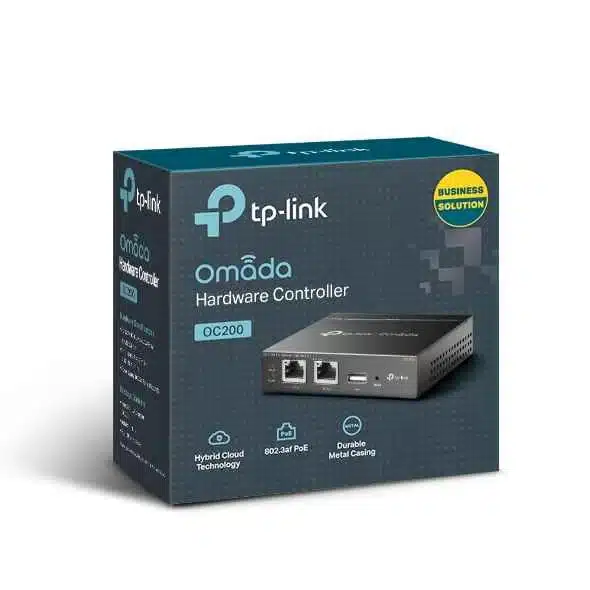
TP-Link Omada Hardware Controller - TL-OC200
Price on request
In StockKey features:
- Centralized Management: Supports up to 100 Omada access points, 10 Omada routers, a maximum of 20 Omada switches, and a maximum of 2 certain Delta Stream GPON OLTs†
- Free Cloud Access: Manage and monitor with the Omada app or Web UI from anywhere, anytime.
- On-Premises Management: Locally monitor and manage devices with the ultimate security and stability.
- Flexible Power Supply: 802.3af/at PoE or Micro USB (DC 5V/Minimum 1A) for flexible installation.
- Easy and Intelligent Network Monitoring: The easy-to-use dashboard makes it simple to see the real-time network status and traffic distribution.
- Real-Time Network Topology: Helps IT admins quickly see and troubleshoot connections at a glance.
- Easier Network Maintenance: WiFi heatmap simulator, visualizable network report, and batch & multi-site management benefit network maintenance
Product Description
TP-Link Omada Hardware Controller TL-OC200
These days, good network management is super important. If you're running a business like a hotel, school, office, café, or warehouse, the TP-Link Omada TL-OC200 Hardware Controller has gotten pretty popular. It's a solid option for businesses that want good Wi-Fi management without having to pay cloud fees all the time.
What's the TP-Link Omada TL-OC200?
Basically, the TL-OC200 is a controller for the TP-Link Omada SDN (Software Defined Networking) system. Instead of being just a cloud thing or a software thing, the OC200 is a small, quiet box that runs the Omada controller software right on your network.
Here's a quick look at what it can do:
- Works with up to 100 Omada access points, 20 Omada switches, and 10 Omada JetStream routers
- Has 2 Ethernet ports
- Has a USB port for backups
- Doesn't need a fan, so it's silent
- Has a metal case, so it's tough
- You can power it with PoE or the included power adapter
- Lets you manage everything from one place and you don't have to pay any subscription fees
Why Pick a Hardware Controller?
Lots of businesses start with the free Omada Software Controller or the OC300/Omada Cloud. They're good, sure, but the TL-OC200 is better if:
1. You Don't Want to Rely on the Internet
The hardware controller can work completely offline. Stuff like guest portals and bandwidth limits will still work even if the internet goes down.
2. You Don't Want to Pay Fees
Some other systems make you pay fees, but the Omada Hardware Controller doesn't.
3. You Want Good Performance
Since it runs on its own hardware instead of a PC, it's faster and less likely to crash.
4. You Want Better Security
Your network data stays where it is. This is great for schools, clinics, law firms, or anyone who needs to keep their data private.
How Well Does It Work?
In 2025, the TL-OC200 runs Omada Controller version 5.13+ and works with version 6.0. This means some good stuff:
- You can manage site-to-site VPNs
- Omada Mesh & Fast Roaming make Wi-Fi handovers smooth
- It can improve your Wi-Fi and steer devices to the best band
- It can show you what clients are doing
- You can limit speeds per SSID or client
- It supports Hotspot 2.0
- It has a better voucher system
It's good for places like:
- Hotels & BnBs (for guest portals)
- Schools (for separating student/staff Wi-Fi)
- Restaurants & cafés (for social logins and bandwidth limits)
- Offices (for secure corporate Wi-Fi and a guest network)
- Warehouses & factories (for long-range Wi-Fi and monitoring)
- Clinics (for privacy reasons)
Set Up
Omada is known for being easy to use.
Here's how to set it up:
1. Plug the OC200 into your network
2. Find the controller in your browser
3. Log in and follow the setup wizard
4. Add your access points, switches, and gateways
5. Add floor plans, create SSIDs, set up the guest portal
Cool Features
1. Free Guest Portal
You don't need to pay for a third-party service.
2. Manage Multiple Sites
You can manage multiple locations from one OC200.
3. Omada Mesh
You can extend your Wi-Fi without running cables.
4. PoE Power
You can power it with a PoE switch.
5. Automatic Backups
You can schedule backups to a USB or FTP server.
6. Client History
You can see which devices have connected and block ones you don't want.
7. Load Balancing
It can move devices to the best Wi-Fi band.