TP-Link
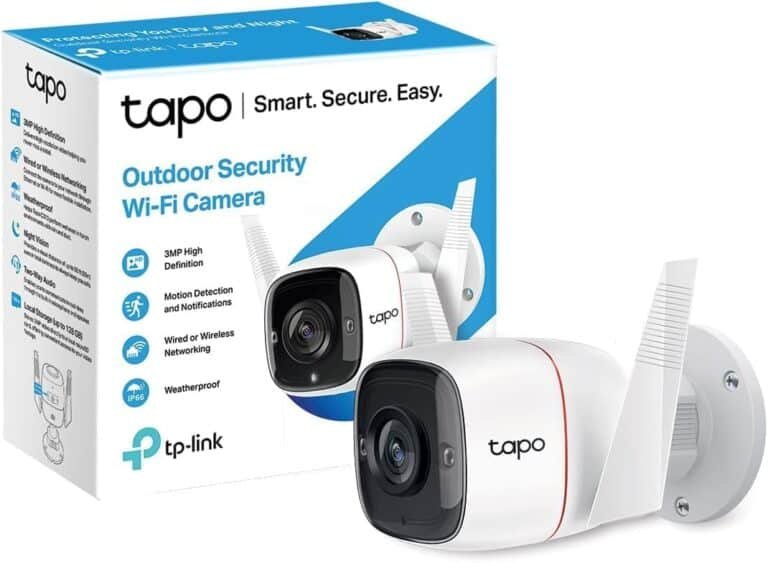
TP-Link Tapo Outdoor Security Wi-Fi Camera - TL-TAPO C310
KES 5,500
In Stock-
Durable IP66 rated design for all weather protection.
-
Records in crystal clear 2K (2304 × 1296) resolution.
-
Captures fine details such as faces, objects, and license plates.
Product Description
TP-Link Tapo C310 Outdoor Security Camera
Home security is super important these days, and the TP-Link Tapo C310 is a really popular outdoor Wi-Fi camera. You can get it at our shop for a great price. It has 2K QHD video, good night vision, is made for all weather, spots motion, has two-way talk, and works with your smart home stuff – all without costing a fortune.
If you need a solid outdoor camera with lots of features and no need for expensive subscriptions, this guide will tell you everything you should know before you buy the TP-Link Tapo C310 .
Why the TP-Link Tapo C310 is Still a Top Outdoor Camera
Even though it came out a few years ago, the Tapo C310 is still a winner. Here’s why people pick it over newer and more expensive cameras:
- Great Video: 2K resolution (better than 1080p)
- Weatherproof: Works in rain, dust, and hot or cold temps
- Night Vision: Sees up to 30 meters in the dark
- Smart Motion Detection: Knows the difference between people and cars (this was added in a recent update)
- Local Storage: Save videos on a microSD card (no need for cloud subscriptions)
- Works with Alexa, Google Assistant, and IFTTT
- Free Trial: You can try Tapo Care cloud storage for 30 days if you want
Phonex Tech usually has it for less than other stores, too.
What Makes the Tapo C310 Great
1. Clear 2K QHD Video – Day and Night
The Tapo C310 records in 2K, so you get clearer video than with many cheaper cameras. It’s good for seeing license plates or faces.
The camera has a good lens and sensor, so it works well even when it's dim out.
2. Night Vision with Spotlights
The newest version has a spotlight mode. When it sees something moving at night, it turns on bright LEDs, so you see color video instead of black and white. This makes it as good as cameras that cost way more.
3. Weatherproof Build
This camera can handle:
- Water
- Really hot and cold temperatures
- Dust and sand
4. Smart Motion Detection (People and Cars)
The Tapo C310 can tell the difference between:
- People
- Cars
- When someone crosses a line
- When someone enters an area
It can also detect a baby crying if you use it inside. This means you don't get alerts every time a tree moves.
5. Two-Way Talk and Siren
Talk to people at your door or scare off intruders with the microphone and speaker. You can set off the loud siren if someone moves near the camera.
6. Local Storage and Cloud Option
Put in a microSD card and record all the time or only when something happens. If you want to keep your videos safe somewhere else, you can pay for Tapo Care cloud storage.
Easy to Set Up
The Tapo C310 is easy to get going:
1. Get the Tapo app
2. Plug in the camera
3. Scan the code
4. Connect to your Wi-Fi
5. Screw it in where you want it
You don't need any extra stuff. It just works with your Wi-Fi router.
Where to Put Your Tapo C310
Good spots are:
- Porch
- Backyard
- Driveway
- Side of your house
- Near a pool
The camera sees a wide area, so it's good for most homes. If you have a big property, you can get a few of them.